
 Customize View options for Ungraded / Grade 9 /PSA 10 display bar

An option to let people set what columns they can view for cards, versus only Ungraded / 9 /PSA 10
If it could be an option where we could choose to show other grades like 7 or 8, and even for 10's, let it show / choose All company 10's and not just PSA 10's?

allow estimates on ungraded cards in our collection
Right now when sorting my collection by potential grading profit, it's putting one of my cards to the top based on an estimated 10 rating, my card will definitely not be a 10, so I'd love the ability for ungraded cards, to put my estimated grade to help inform the actual potential grading profit.

Allow filtering out hardware in search results
When searching either the main site or your collection, the ability to filter between either hardware (consoles, controllers, accessories, etc.) or software (video games) would be very helpful. I often find myself trying to figure out what some of the most valuable games on different platforms in my collection are, and I end up having to scroll through a lot of hardware for that platform when sorting by highest price first, since of course most game consoles sell for a lot more than most of their individual games.

Add YuGiOh european expansions
As many of you know, Yu-Gi-Oh! has different expansion codes across Europe that differ from the English versions, for example:
SDY → English
BIY → Spanish
DDY → French
MIY → Italian
DIY → Portuguese
SDY-G → German
Currently, there is no option to add cards from many of these older expansions to our collections, and the prices can differ significantly between languages and editions.
Cardmarket already lists these versions separately, so it would be great to see PriceCharting add them as well.

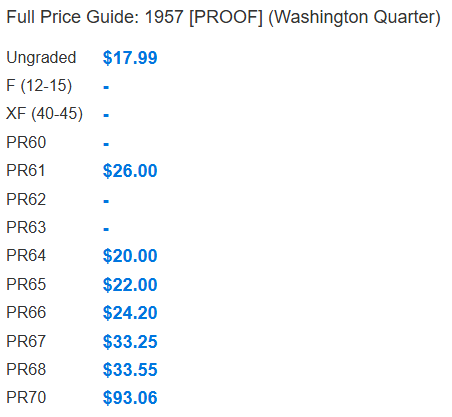
PR 69 in Full Price Guide
I love using price charting to help me with listing my coins. But I noticed that by the full price guide there is PR 60-68 and PR 70 but no PR 69. Can you please add that option?

Add the Game boy sewing machine games and the other colors
The games i would like see are
- Jaguar Mishin Shishū Sen'yō Soft: Mario Family
- Raku x Raku Cut Shū
- Raku x Raku Moji
- Raku x Raku Mishin
there's also other colors then the ones that are on here
i know there are people who own these games who want them added i would like to add them to my wishlist on here i use so ik what games to look for when I'm out looking for games.

I've added those games now. I will look into the Sewing Machine colors and decide about adding them as separate items or not. They are not very common items, so it might give worse prices by breaking them out by color.

Show Historical PSA/CGC POP Report
It would be extremely helpful if each trading-card page showed how its PSA/CGC population has changed over time, rather than only showing the current population by grade.
Ideally, the Population Report section would include a historical chart with:
- PSA 10 population over time
- PSA 9 population over time
- Total PSA/CGC population over time
- Population added during the last 30, 90, 180, and 365 days
- Percentage growth during those periods
- The dates of the population observations
- An option to select other grades
- Monthly or weekly history where available
A simple summary could show:
- Current PSA 10 population
- New PSA 10s during the last year
- Annual PSA 10 population growth
- Current gem rate
- Whether population growth is accelerating or slowing
Price history is much more useful when it can be compared with supply growth. For example, two cards may have similar prices, but one may have a stable PSA 10 population while the other is adding hundreds of new PSA 10s every month.
PriceCharting already has historic sales charts and current graded population information, so adding population history beside the price history would make the trading-card research pages substantially more useful for deciding whether a card is worth grading, buying, or holding.
Multiple wishlists
I'd like to have multiple wishlists for enhanced organization. I can imagine a wishlist per set or wishlist for the cards I really want and cards I only kind of want. There are probably multiple ways of doing this, such as ranking/prioritization or tagging/filtering.

Add # of sales at the grade level vs. item level in the API
I use the SportsCardsPro API (/api/product) and would like to request one addition: sales volume broken out by grade, matching the grades the price fields already cover.
Today the API returns a single product-wide sales-volume, while prices are returned per grade — ungraded, PSA 9, PSA 9.5, PSA 10, BGS 10 and so on. That makes the volume figure impossible to attach to the price it sits next to. A product reporting 90 sales might be 84 ungraded, 4 in PSA 9 and 2 in PSA 10, and the API gives no way to tell.
Something like this would fully solve it:
"sales-volume": 90,"sales-volume-by-grade": { "ungraded": 84, "psa-9": 4, "psa-9.5": 0, "psa-10": 2, "bgs-10": 0}
Currency conversion in portfolios
Hi, I’m a frequent traveler and I get cards in all different currencies. In my portfolio, when I change the main currency, the amount stays the same (example: before it was 50,000 IDR - change to USD - becomes 50,000 USD). This has been a little inconvenient for similar numbered currency and it makes me lose track of how much I actually got the item for (like AUD and USD - both can be 15 dollars but different in actual value). I’d really appreciate it if you can make a feature that auto converts currency. Thank you in advance!
Customer support service by UserEcho
